User scottoox4 uploaded the image
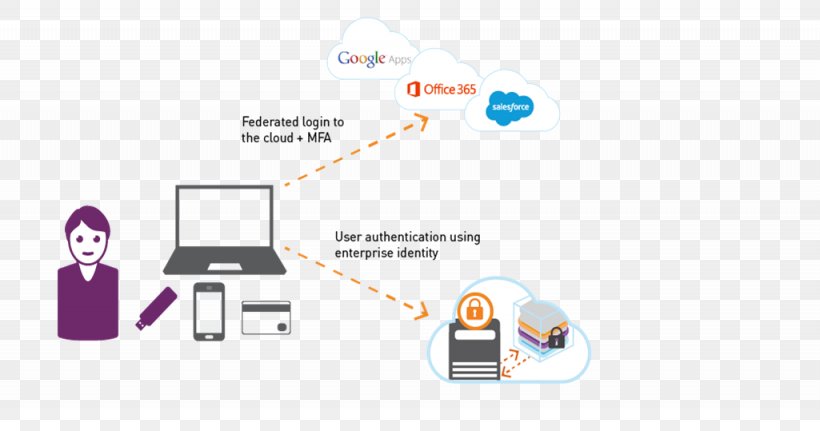
An illustration that shows how Google Apps and Office 365 are connected to a cloud. On the left side of the image, there is a person with purple hair and a purple shirt, representing the user authentication process. On the right side, there are two clouds, one with the Google Apps logo and the other with the Office 365 logo. The cloud on the left is connected to the cloud with the text "Federated login to the Cloud + MFA" and the text on the cloud reads "User authentication using enterprise identity". In the center of the diagram, we can see a laptop, a phone, and a tablet connected to each other. The laptop is open and the phone is placed next to it. The tablet is placed on top of the laptop. There is also an icon of a document with a lock on it, representing security. This suggests that the image is related to the use of enterprise identity in the cloud computing platform.
Security Token E-authentication Multi-factor Authentication Single Sign-on Identity Management PNG
. The resolution of this PNG file is 1025 x 539 pixels and it has a file size of 78.85 KB.An illustration that shows how Google Apps and Office 365 are connected to a cloud. On the left side of the image, there is a person with purple hair and a purple shirt, representing the user authentication process. On the right side, there are two clouds, one with the Google Apps logo and the other with the Office 365 logo. The cloud on the left is connected to the cloud with the text "Federated login to the Cloud + MFA" and the text on the cloud reads "User authentication using enterprise identity". In the center of the diagram, we can see a laptop, a phone, and a tablet connected to each other. The laptop is open and the phone is placed next to it. The tablet is placed on top of the laptop. There is also an icon of a document with a lock on it, representing security. This suggests that the image is related to the use of enterprise identity in the cloud computing platform.
Security Token E-authentication Multi-factor Authentication Single Sign-on Identity Management PNG
Related PNG Images